


Read it in their language
English is the main learning language. Lessons can be read in हिन्दी, தமிழ் or ಕನ್ನಡ, and tapping an underlined key word shows what it means. Questions and answers stay in English, the way the exam will be.
Tattvik meets your child where they are and never runs out of energy or ideas. However long it takes, it finds another way in: a fresh angle, a new analogy, a worked example, until it clicks. Guided revision, graded practice and exam prep, concept by concept.
Grade 8 Science is live today. More grades and subjects are coming — register to get early access. Teaching a class? See Tattvik on your smart board.
Inside a lesson
Every Grade 8 Science lesson is built from a few short ideas. Each idea comes with a picture, most with something to do, and the lesson ends with questions that show the idea has stuck.
Warm a block of ice and its particles vibrate harder. Keep heating and they break out of their places, then slide past each other, then fly apart.
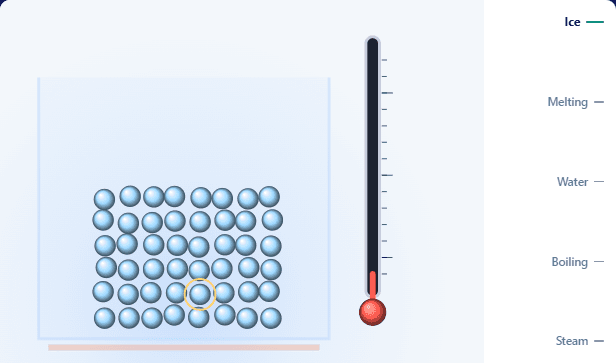
Ice −10 °C
In ice, water particles sit in fixed places. They only vibrate where they are.
Move it to see what happens
A lesson is a few short ideas, not a wall of text. Each one has its own picture and its own example.
Moving visuals play stage by stage, then hand over the slider — warm the ice and watch what the particles do.
The revision path shows every step and the one they are on, so a session has a clear end.
Connections lists what this lesson builds on and leads to. One tap looks back at an earlier idea, then returns.
A task after the idea
A quick task follows an idea, so a child uses it while it is fresh. If they are stuck, Help with this gives a clue that points the right way — then one more try before the answer is shown.
Sort each one: is it matter, or not matter?
Matter
The air inside a football right
A happy thought
A wooden spoon right
Not matter
Light from a torch right
A happy thought (the answer)
3 of 4 right
The checks that finish a lesson
Tattvik finds the exact misconception and explains it a different way — an analogy, a worked example, a step-by-step — and asks again. A concept is revised only when every check question is answered with real understanding.
Now 2 questions — answer them to finish revising this concept
Check 1 of 2 done · last one next
Our teaching approach
A wrong answer is information. We read what it shows, then choose the help that fits it.
Look back opens the earlier lesson's idea and one small task, then returns to the same step — so a gap gets filled without losing the place.
Meaning, cause and process — taught with examples, visuals and analogy.
Why a method works and how to do it — a worked example, guided steps, then an independent attempt.
Ways to learn
English is the main learning language. Lessons can be read in हिन्दी, தமிழ் or ಕನ್ನಡ, and tapping an underlined key word shows what it means. Questions and answers stay in English, the way the exam will be.
Press Listen and the card is read aloud, each part highlighted as it is read, in a voice and speed they choose. Children can also dictate an English reply, check the transcription, then send it. Dictation needs microphone access and a supported browser.
Tattvik suggests a weekly pace from their study days and time; your child adjusts and confirms it. Classroom coverage informs revision but doesn't by itself mark them behind — and the plan has no peer rankings.
Ask in ordinary words — "show me my schedule" — and open the matching page. Ask Tattvik is typed navigation, separate from the tutor chat.
Every topic has a one-page cheat sheet to print for quick revision. The scratchpad for rough work stays on their device — the tutor doesn't read or mark it.
Extra Science lessons sit below the chapters for children who want more. They are optional: never planned, never due, and never counted against the syllabus.
The weekly plan
Your child sets a weekly pace they can keep, and Tattvik turns it into one steady week of goals — what school has set, what you have set, what comes next, and what is starting to fade. Progress is measured against their own plan, not the class.
This week Illustrative plan
Selected across your exam, regular learning and refresh needs.
Science exam is in 6 days · 4 topics to revise · about 1 a day to be ready
3 of 5 completed
suggested, then confirmed
a few topic goals that stay put
concept by concept, until mastered
fading ideas come back in time
an estimated finish date
Assessment that teaches
Marks earned — with partial credit where it's awarded — and performance topic by topic, with Strong, OK and Weak tags that name what to revise. Review the questions, model answers and feedback, then revise weak topics and try again.
Quick Test starts straight away; a planned practice exam lets them prepare towards a date. Both use timed practice papers. A test can come from your child, from you, or from their teacher — and each one shows in their list marked with who set it.
Performance by topic
For parents
The weekly report shows the days they signed in, what they learnt and revised, and how the week is going against their own plan. Set a test on any topics, then see their score and answers. When a subject needs a hand, send a gentle nudge from home.
Weekly report
This week
2 beyond the textbook
This week's plan: 3 of 5 done
Went well:kept up with this week's plan.
Nothing needs your attention this week.
Illustrative report
“Amma's rooting for you — let's give Science a go tonight.”
The pilot
We're taking a limited number of pilot sign-ups — join now and Tattvik stays free for your family, permanently. More grades and subjects are coming; sign up and we'll open them to you first.
For schools & teachers
Schools have put a smart board in every classroom — and teachers are still left to make the content and load it into an LMS before they can use it. Tattvik is plug and play: open the topic on your teaching board and the whole lesson is there, so a teacher can give the period to teaching.
Try it · The liquid pushes upwards
Illustrative lessonTry it: tap the options the class chose, then Show answer. Back and Next step through the lesson.
No slides to build, no content to upload, no LMS to set up. Every lesson arrives ready and reviewed: the ideas, the pictures, the moving visuals, worked examples, tasks, questions and a summary.
It runs in the browser on the interactive panel or projector your classrooms already have. Sign in on the board, open the topic, tap Teach — and you are teaching in minutes.
The teacher sets the pace with Back and Next, or a clicker. Play reads each idea aloud and stops where the class must think, so the teacher teaches the room rather than operating a screen.
In the period
After the bell
Finish the topic on the board and it is marked taught for the class. One more tap sets it as homework or sets a homework test. Each student then revises with their own tutor — and what the class found hard comes back to you as one card: Re-teach on the board.
The teacher's desk
A mistake most of the class shares shows once, as one thing to re-teach. Students are grouped by pace against the class schedule, with the few who need a check-in at the top.
Choose the class, the topics and the day. Students get a plan to prepare; you see each one’s topics revised, papers taken, best score and answers.
Draft a full exam paper from the exam’s setup, add or remove questions, and download it as a Word file to finish offline.
Start from the board’s yearly teaching plan and adjust it for your school. Mark a topic taught and it opens for revision at home.
Run 8A and 8B as separate classes, each with its own teachers and plan. Move a student between classes and their teachers’ access follows.
Add your grades and subjects, invite teachers, and share one join link with students. A parent’s consent is recorded before any child is admitted, and your logo sits on every staff screen.
Start teaching on your smart board in minutes. Every student gets a tutor that reinforces exactly what you taught — and what they struggle with at home comes back to you as signal, not judgement. Free for three months.
Questions
Straight answers on how Tattvik teaches, what it costs, and how we treat your child's data.
For parents
A personal AI tutor for Grades 8–12 that does at home what a good teacher does in class — only one-to-one, with unlimited patience. It follows exactly what school is teaching: the same board, the same syllabus, the same chapter, at the same point in the term. It re-explains each concept as many times, in as many ways, as your child needs, and checks through practice that it genuinely stuck before moving on. Lessons are built from small ideas, each with a picture — many of them pictures your child can move — and a quick task to try. The pilot is live today for CBSE Grade 8 Science; more grades and subjects follow.
Tattvik doesn't hand over the answer. On a task inside a lesson, Help with this gives a clue that points the right way, then one more try. If a couple of tasks in a row are hard, it offers to slow down: explain the idea more simply, look back at the earlier lesson it builds on, or take a short break. On the questions that finish a lesson, it explains the idea a different way — a new analogy, a worked example — and asks again. Only after three genuine attempts does it walk through the answer properly, and then it asks a fresh question on the same idea. A concept counts as mastered only when your child gets there themselves.
Yes, and it says so. At the start of a lesson Tattvik tells your child that it is an AI tutor and can make mistakes — and to ask about anything that looks wrong, or tell a teacher or parent. The lessons themselves are written and approved in advance, not made up on the spot; what is generated live is the tutor's reply to your child's own answer.
Most chatbots will scaffold an answer if you ask them to — that isn't the difference. Tattvik teaches to a method, on your child's actual syllabus, and it remembers. It follows your board's sequence and what the class has already been taught, keeps a running picture of which concepts are solid and which are shaky, and comes back to the weak ones day after day. A chat session ends and forgets; this is the same tutor every evening, still holding the thread.
No. Bring it schoolwork and it behaves like a tutor, not an answer key — it won't write the essay, and it guides your child to their own answer. You can also turn on a stricter mode if you'd rather it held the line harder.
Tattvik teaches in English. Lessons can also be read in हिन्दी, தமிழ் or ಕನ್ನಡ to help an idea land, and tapping an underlined key word shows what it means — questions and answers stay in English, the way the exam will be.
On purpose. We'd rather get one subject genuinely right — taught properly, measured honestly — than list thirty on a landing page. More grades and subjects follow once this one has earned them.
Nothing, permanently. Families who join during the pilot keep Tattvik free for good — not a trial, not a year. We're keeping the pilot deliberately small: it's the number of families a small team can support well.
You can see what your child is working on and where they're getting stuck — without having to sit beside them every evening. Your weekly report shows the days they signed in, the concepts they learnt and the topics they revised, alongside progress against their own plan. You can also set a test on any topics and see their score and their answers.
This is where we're strictest. Data is encrypted in transit, access is locked down by role, and we keep only what we need — old data is deleted once its retention window is up. We ask a parent to consent before your child gets going and record it with real proof: the exact policy version accepted, by whom, and when. You can withdraw that consent and have your child's data erased. We don't show ads, and we never sell data.
A browser on a phone or computer — there's nothing to install. Sign up at app.tattvik.ai; it takes a few minutes. The pilot is open in India for now.
For schools & teachers
It follows exactly what you're teaching — the same board, the same syllabus, the same chapter, at the same point in the term. It isn't a parallel course competing with your classroom for a child's attention: it picks up where the lesson left off. Teach the lesson from your smart board, finish the topic, and it opens for revision with the tutor, concept by concept, consolidated with timed practice papers. And every child in the class gets the same tutor — the same patience, the same attention, for all of them.
Yes — it is plug and play. The Teaching screen runs in the browser on the interactive panel or projector your classrooms already have, so there is nothing to install. A teacher signs in on the board, opens the topic and taps Teach. The lesson fills the board as large cards the teacher steps through with Back and Next, or a clicker.
Nothing. Schools have smart boards, but teachers are usually still left to make the content and load it into an LMS. Tattvik arrives with the lesson ready — the ideas, the pictures and moving visuals, worked examples, tasks with their answers, and a short re-teach for each common mix-up. A teacher can start teaching in minutes and give the period to the class rather than to setting up a screen.
Yes. A teacher can set a dated test for a class— choose the class, the topics and the day. Students get a plan to prepare and a practice paper, and the teacher sees each student's topics revised, papers taken, best score and answers. For printed exams, one click drafts a full question paper from the exam's setup; add or remove questions, then download it as a Word file to finish offline.
No — it reinforces them, and the loop runs both ways. What you teach in class gets reinforced at home, instead of the two pulling in different directions: Tattvik gives every child the personal teaching a full classroom can't — meeting each student where they are, re-explaining as many times and in as many ways as it takes, on the topics you've actually taught, until it holds. And what a child struggles with at home comes back to you as a signal, not a judgement: this concept didn't land, and here is where — so you can address it in the next lesson instead of discovering it at the next test.
Concept-level signal, not surveillance. Teachers see which ideas the class is finding difficult — the misconceptions several students share, the ones worth reteaching to the whole room — and where each student stands, topic by topic. It's built from real revision and practice, not scores alone, and it is not a record of every conversation a child has with the tutor. Leadership sees the same picture rolled up across classes.
Deliberately conservatively. Encryption in transit, role-based access control, and retention windows that prune data on a schedule. We ask for parental consent at sign-up and record it verifiably — the policy version, the guardian, the timestamp — and log erasure when consent is withdrawn. No ads inside the product, and we never share your child's personal or learning data with third parties — we measure our own ad performance without sharing your data. We're happy to walk your data-protection lead through the details.
Start with a free three-month trial — run it with real classes, no commitment. What it costs after that depends on what you need: how many grades, which subjects, how you want to roll it out. We'll work that out with you.
Your school can be live in five minutes. No implementation project, no customisation phase, no advance or implementation payments — that era is over. Sign up, and you're ready to support your students on the free three-month trial. Run it with real classes — no commitment, no payment — then decide. It's as easy as setting up Gmail for your organisation, and it's the same five minutes whether you start from a demo or sign up directly. For a demo, write to contact@tattvik.ai — a live session, the class reporting, and how onboarding works.
Something we haven't answered? Write to contact@tattvik.ai.
